
 United States
GuideConnect Update Now Available - Bringing Images to Life
Published:

The latest GuideConnect release for November 2025 is now available. This release introduces exciting new tools to make your daily life more accessible, giving you a richer experience of visual data, so you can independently experience shared or downloaded images.
Featuring new functions that Describe Images in an astounding level of detail, and a new Help Menu which enables you to ask questions for instant guidance. Upgrade now to experience it for yourself.
New in GuideConnect November 2025
 New GuideConnect Update Brings Images to Life
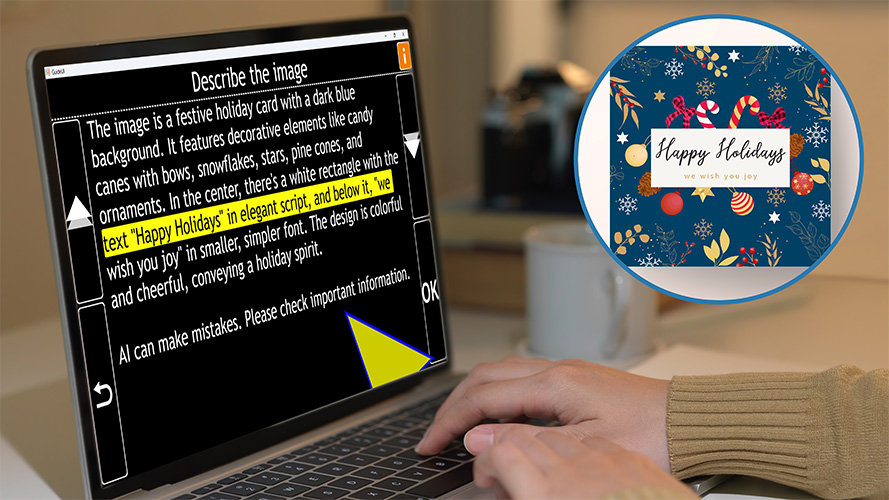
The new release of GuideConnect is here and its brand-new Describe Images feature is set to make this winter a time of better accessibility for people with sight loss.
For many older people, especially at this time of year, photos, cards and pictures play a big part in feeling included in family life. When it's difficult to see the details of a photo or independently read messages in a Christmas card, it’s easy to feel left out of the moment. With this new update, GuideConnect changes that completely.
See the Whole Picture – With Words
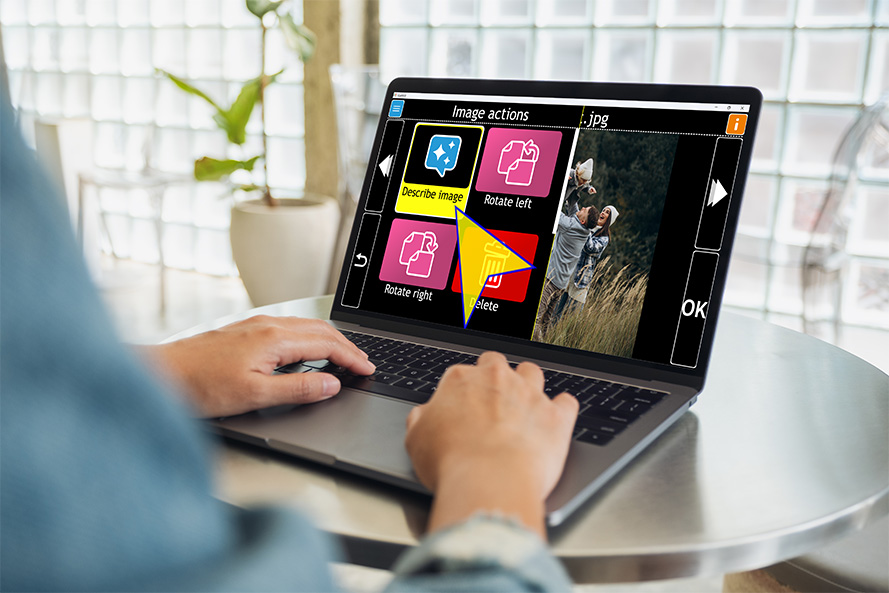
The new Describe Images feature in GuideConnect uses AI to give you clear, detailed descriptions of any photo, scanned image or picture saved on your computer. With just one press in the Actions menu, GuideConnect tells you what’s in an image — describing people, objects, colours, layout, text and even handwriting.
This means you can really enjoy the photos your friends and family share with you, you can get a detailed description of the Christmas Card illustrations arriving through the post, and hear the messages which are written inside - and all of this can be done easily and independently.
 Ask Follow-Up Questions for Even More Detail
One of the most empowering parts of this new feature is the ability to ask follow-up questions.
- Want to know what someone is wearing?
- Curious about the decorations in a room?
- Trying to picture a family gathering or a snowy scene?
Just type your question and GuideConnect will give you more information about your image instantly. GuideConnect puts you in control of what you'd like to know, and you can go into a level of detail that suits you.
Describe Images is a new feature which is available to GuideConnect users with an up to date GuideConnect Upgrade Agreement.
If your Upgrade Agreement is out of date, or you're using an older version of GuideConnect, contact our friendly sales team now to buy a new one.
Making it Easier to Use GuideConnect
The GuideConnect November release makes it easier for you to access product information through the in-product Help, so you can use GuideConnect without interruption.
This update introduces a new Help Menu which gives you the option to 'Ask a Question'. Here, you can simply type in a question about any GuideConnect function or feature and immediately get the guidance you need.
For example you might want to know 'How do I add a birthday to my calendar?', 'How can I quickly speed up the voice?', 'Where is the podcasts list?' There's no need to be formal, you can ask GuideConnect a question as you might a friend and it will provide simple instructions, so you can learn and complete tasks quickly and easily.
Additional Improvements and Fixes
Guideconnect November 2025 release also makes emails, websites, books and documents more accessible and easier to use.
NEW in Emails:
- You can now print lists of email attachments.
- With some Czech email providers, messages are now sorted chronologically, to ensure the most recent emails arrive at the top of your inbox.
NEW in Websites:
- A “Save PDF” option in the Actions Menu enables you to save the PDF you are viewing in your Downloads folder.
- For easier navigation, “Buttons” and “Edit Fields” are now available via the Actions Menu when you are browsing webpages.
Selecting these options enables you to create a list of the buttons and edit fields on the page, so you can skip straight to the one you need.
NEW: Tools: “Spellcheck” is now available in the Tools Menu, this enables you to view, add and remove words from your custom dictionary.
NEW: PDFs: Search for text in PDF view using CTRL + F
NEW: Text Areas: GuideConnect automatically applies a capital letter at the start of a sentence when typing in text areas when you are composing emails, writing documents and crafting letters.
FIX in Books and News:
- Your reading positions are saved after restarting GuideConnect
- Successfully open DAISY Books from an external drive and read in GuideConnect
FIX: Scanners and Cameras: The voice no longer announces information about the formatting when reading text that has been scanned.
FIX: Dictation: Your first dictation begins immediately, rather than starting on your second dictation, so text is recorded in real time.
 About GuideConnect Upgrade Agreement
A Dolphin Upgrade Agreement is a service plan that ensures your GuideConnect software stays up to date with the latest features, fixes and compatibility improvements.
It gives you peace of mind that updates are installed as soon as they are released, to ensure you have the best possible experience with GuideConnect.
Your GuideConnect will keep up with changes to Windows and other technologies as they continuously evolve.
The GuideConnect Upgrade Agreement includes:
- Regular software updates, automatically applied
- Describe Image feature for better image accessibility
- Dedicated telephone and remote support in the UK
- Peace of mind that GuideConnect continues to keep up with rolling updates to Windows 11
How to Update GuideConnect
If you have an active GuideConnect Upgrade Agreement, your software will update automatically.
If not, you can upgrade easily:
-
In the UK: Call the friendly Dolphin Sales Team on 01905 754 577
-
Outside the UK: Contact your local Dolphin Dealer
Explore GuideConnect
GuideConnect is user-friendly tech for people with sight loss. Find out how you can use GuideConnect to send emails, make video calls, browse the web, read print, listen to audiobooks, radio stations and more.
Free 30-day Trial
Try GuideConnect free for 30 days and discover how easy it is to stay independent, connected and entertained. The trial of GuideConnect includes product support to help answer any queries you have.
Dolphin Blog
Looking for help and advice on assistive technology? Explore the Dolphin Blog to discover how assistive technology is helping people with sight loss around the world to succeed in education, at work and at home.
Share this story now:


