
 United States
Join the reading revolution! New features in EasyReader Education
Published:
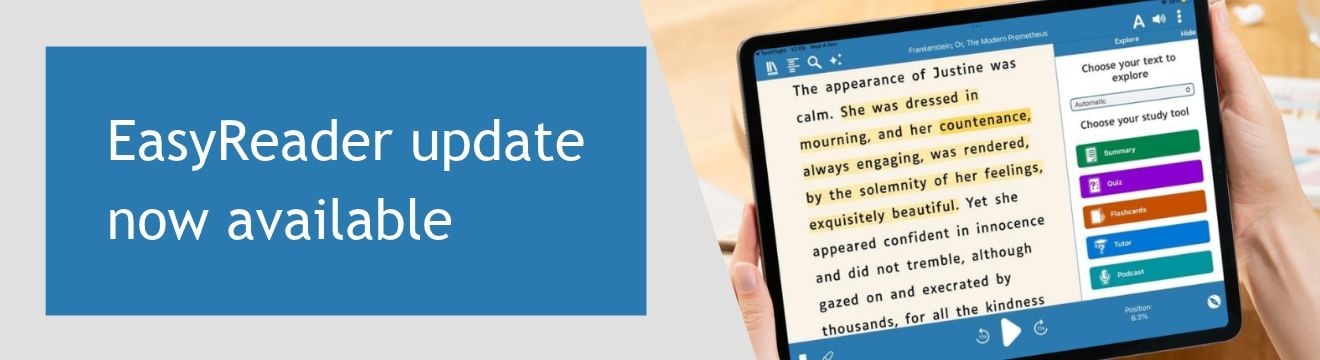
EasyReader is designed to remove barriers to reading, helping more people with dyslexia and other print disabilities to read and learn in ways that work for them.
The latest update - EasyReader version 2026.06 - introduces new ways to learn, boosting comprehension and retention.
Using the latest Explore study tools in EasyReader Education, students can turn text into podcasts, save study activities as bookmarks and use compatible Reading Pens with EasyReader for Windows.
To ensure your school, college or university is fully-equipped to support neurodiverse students and others with special educational needs, learn more about EasyReader Education and book a discovery call with the Dolphin team today.
What's New in EasyReader Education
New Explore Tool: Create Podcast
The Explore tools in EasyReader Education help students engage with the text they are reading, enabling them to study independently by creating Summaries, Quizzes and Flashcards, and using the AI Tutor to boost their comprehension, exploring the text in more detail.
Version 2026.06 introduces a new way to explore a topic: Podcasts.
Perfect for audible learners, the new Create Podcast tool transforms selected text into an AI-generated podcast. Students can listen to the information being discussed, helping them approach a topic in a different way. This boosts their understanding and creates a new resource for further study.
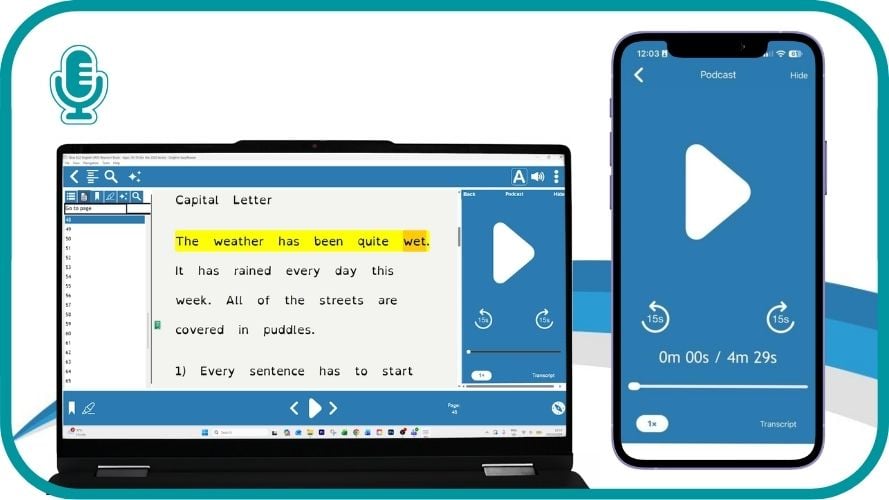 Turn reading into listening and understanding
Supports comprehension: Students can listen to information from a book or document being discussed as a podcast.
Create study resources: Turn selected text into audio that can be revisited when preparing for lessons, coursework or exams.
Choose how the podcast sounds: Students choose from a range of voices, languages, lengths and podcast styles.
Works for different learning preferences: Choose an educational, casual or informative style to suit the student and the subject.
Create Podcast is particularly helpful for students who find it easier to process information by listening or who want another way to revisit the key points from their reading.
Save and Revisit Explore Activities
Explore tools give students practical ways to work with the information in their books.
In EasyReader 2026.06, every Summary, Quiz, Flashcard or Podcast created using Explore is saved directly in the book as an Explore bookmark.
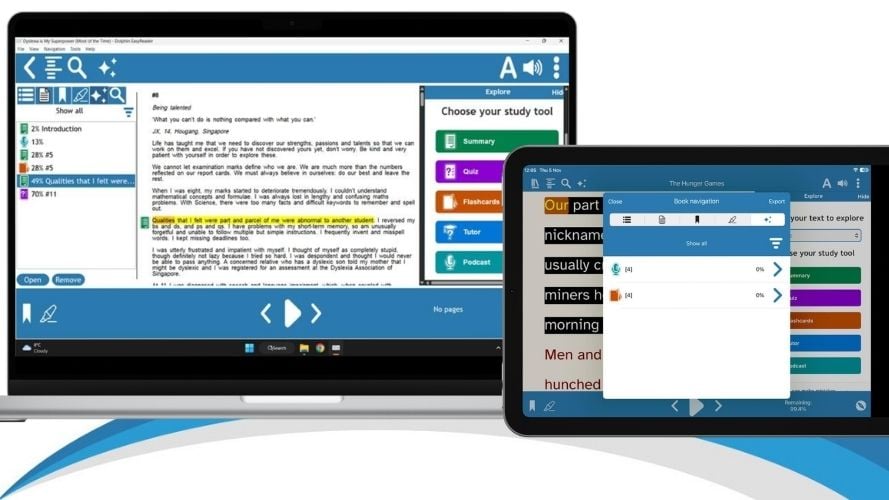
Find previous study activities
An Explore icon appears next to the relevant text, helping students quickly identify where they have previously used an Explore tool. They can open the bookmark to return to the saved activity without having to find the original passage or create it again.
This keeps each activity connected to the part of the book it came from, making it easier for students to organise their revision and build a useful collection of study resources as they read.
Students can use Explore bookmarks to:
- Return to saved Summaries, Quizzes, Flashcards and Podcasts.
- See where Explore tools have already been used within a book.
- Revisit important topics when preparing for coursework or exams.
- Keep personalised study resources connected to the original text.
Explore bookmarks are available across every device a student uses with EasyReader Education, so saved activities can be accessed at the point of need, whether that's at school, at home or while on the bus!
Learn more about the Explore tools in EasyReader >
New Reading Pen Support for EasyReader on Windows

EasyReader for Windows now supports compatible Reading Pens, so students can scan printed text at the point of need. This helps them decode printed words on the page and read class handouts.
Students can upload these from their reading pen into EasyReader Education for further study, if images are uploaded from compatible pens, students can hear vivid descriptions of charts, diagrams and even handwritten notes.
When students scan printed text with their reading pen and import it into EasyReader, the text is available across their devices. They can adjust how it looks, listen to it being read aloud and use Explore tools to support comprehension and further study.
A joined-up approach to reading and revision
EasyReader Education with Reading Pens creates a connected journey from printed text to accessible reading and study support.
- Import scanned text: Transfer the text scanned with a Reading Pen directly into EasyReader for Windows.
- Read in an accessible format: Adjust the text display and listen to content using EasyReader text-to-speech tools.
- Explore the information: Ask questions using the Tutor, and Create Summaries, Quizzes, Flashcards and Podcasts from imported text.
- Access image descriptions: Transfer photographs captured with a compatible pen and use EasyReader Education to explore descriptions of diagrams, handwritten notes and other visual content.
- Listen to recordings: Transfer and play MP3 recordings captured using the pen.
This joined-up approach supports students as they move from reading and understanding a text to embedding what they have learned. It can be particularly helpful for students with dyslexia and other print disabilities.
EasyReader Education with Reading Pens is available as a student bundle, and free trials are available for any school, college or university setting.
Premium Study Features
Create Podcast and the other Explore tools are premium features, available to schools with an EasyReader Education subscription.
These tools give students more ways to engage with information and check their understanding. Saving each activity as an Explore bookmark also means their work is ready to return to when they need it.
Additional Improvements
EasyReader version 2026.06 also includes improvements designed to provide a more accessible reading and listening experience for all users:
- Improved MP3 playback: Updated audio technology supports playback speeds from 0.5× to 4×, with clearer audio across the available speed range.
- Easier newspaper and magazine browsing: All available NFB Newsline newspapers and magazines are now listed together, making content easier to find.
- Bug fixes and refinements: Improvements across all supported platforms provide a more accessible and reliable reading experience.
Try EasyReader Education with Reading Pens
EasyReader Education with Reading Pens helps students move from printed text to accessible reading, comprehension and further study.
Educators can request a free trial to explore how the student bundle supports learners with dyslexia and other print disabilities.
Discover EasyReader Education
EasyReader Education helps educators and support teams make books, documents and curriculum resources accessible to more students.
Students can read using their preferred colours, fonts, text size and speech settings, then use Explore tools to support learning and revision.
Explore the Dolphin Blog
Discover practical ideas for supporting accessible learning and find out how assistive technology can help students read independently.
The Dolphin Blog includes articles for teachers, support staff, students and families.
Share this story now:


