 United States
EasyReader for Windows 2026.06
Released:
Languages supported: Arabic, Danish, Dutch, English (Australia), English (Canada), English (New Zealand), English (South African), English (United Kingdom), English (United States), Finnish, French, French (Canada), German, Hebrew, Italian, Japanese, Norwegian, Polish, Russian, Swedish, Turkish
New in EasyReader Version 2026.06
The latest version of EasyReader app is now available. Update now to take advantage of important maintenance updates and new features that make reading more accessible to readers with vision impairments, dyslexia and other print disabilities.
EasyReader version 2026.06 continues to support education, offering new ways to learn, study and revise independently.
New Premium features available to EasyReader Education users, EasyReader Personal Plan subscribers and selected library members include:
- Turning selected text into podcasts
- Saving Explore results within books
- Use Reading Pens with EasyReader for Windows
New Explore Tool: Create Podcasts
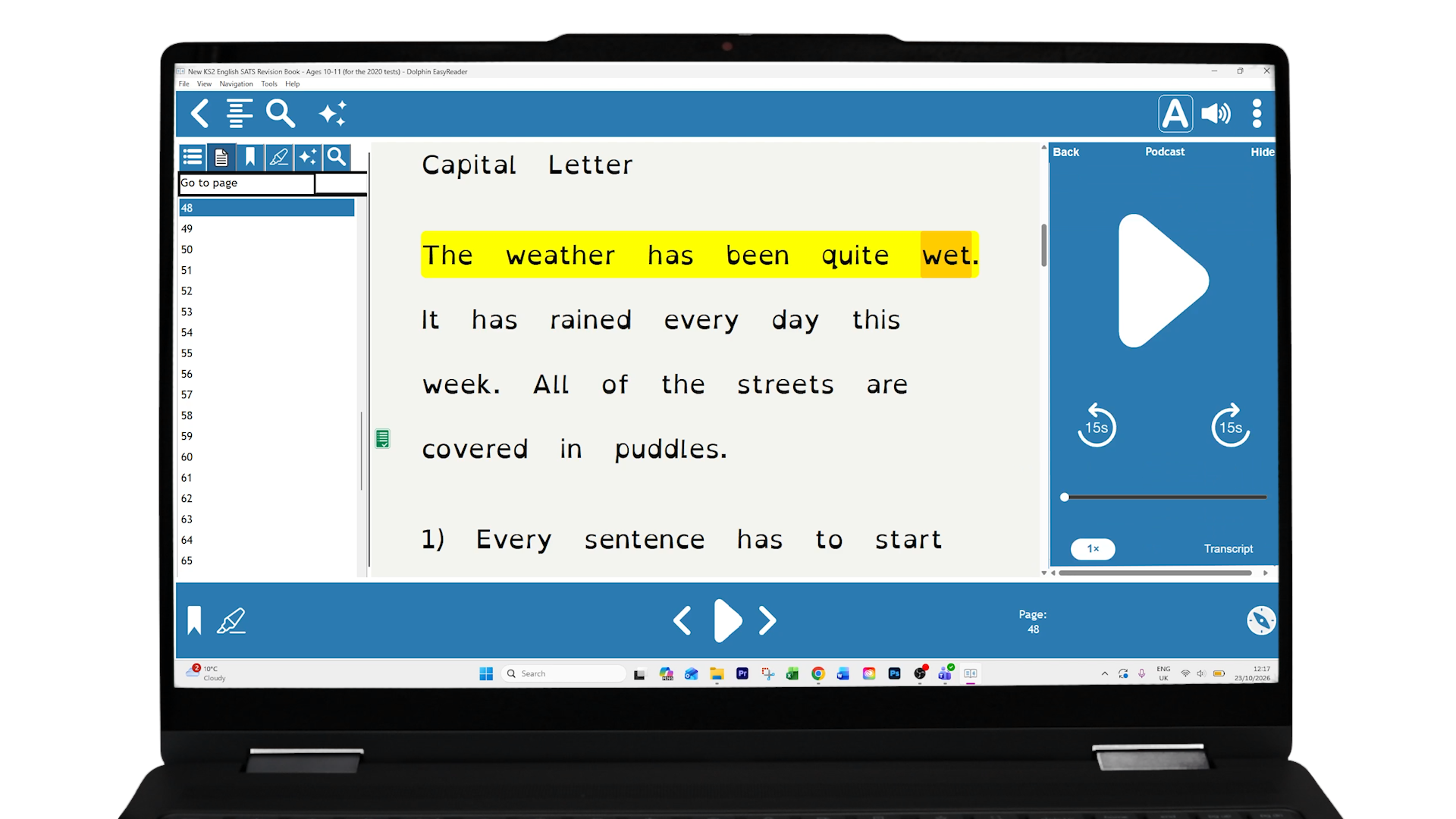
Readers and students who prefer to listen to study materials can now transform any text into an engaging, AI-generated podcast!
 Learning through conversation
The new Podcasts Explore tool puts text into a format that feels natural and engaging. The tool transforms selected text into an AI-generated podcast, where virtual hosts discuss key ideas and concepts in a clear, conversational way.
With EasyReader Education, students can turn any accessible text into their own study podcast in just a few taps. They can choose different voices, languages, styles and lengths to match the way they learn best.
This helps improve comprehension, supports revision and makes it easier to absorb and remember information. Giving students greater flexibility, independence and confidence as they prepare for lessons, coursework and exams.
Try this new feature with a 30-Day EasyReader Education Trial >
NEW: Explore Tools Bookmarks
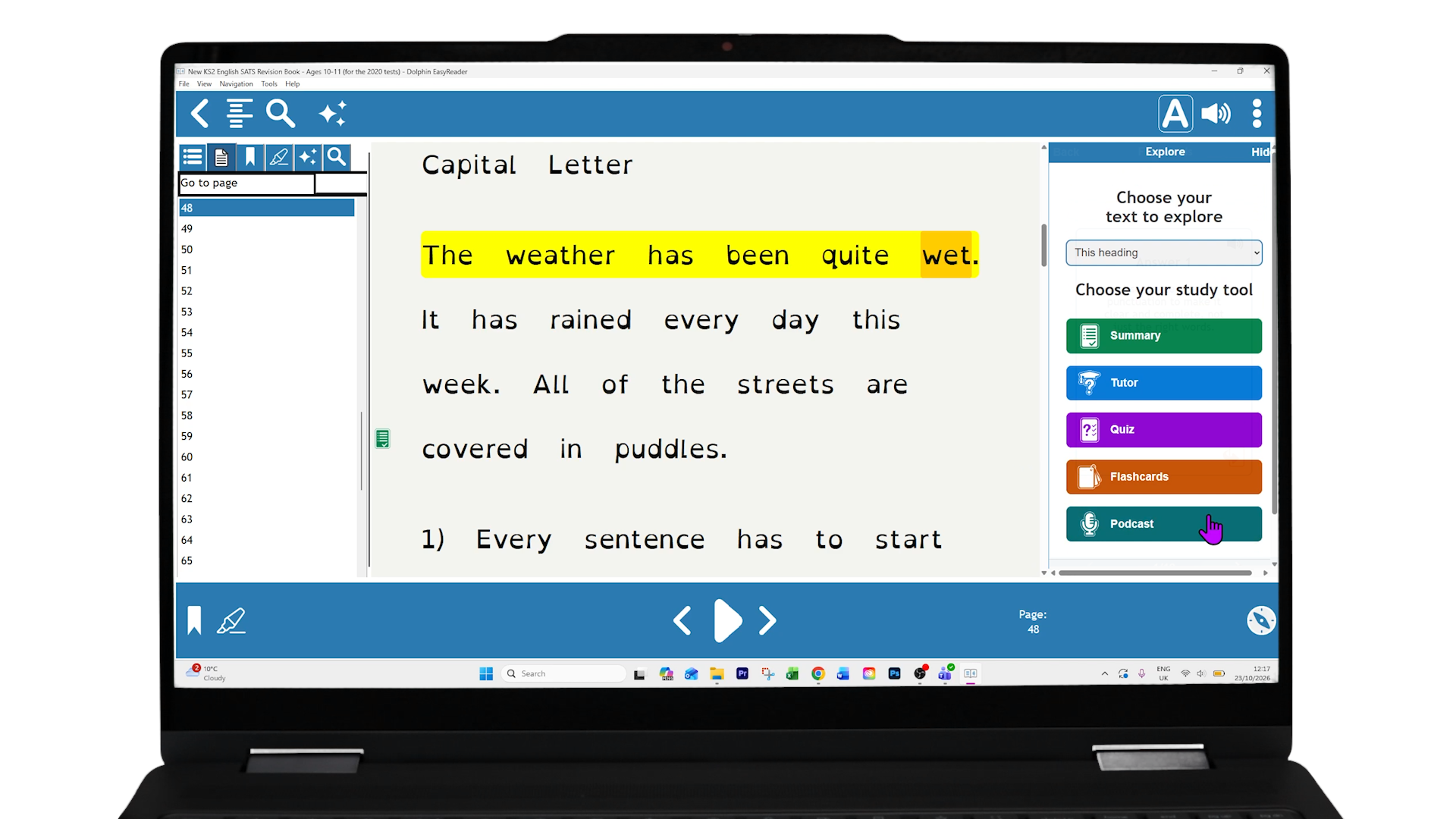
Any Summary, Quiz, Flashcard or Podcast created using Explore tools is now saved directly in your book as an Explore bookmark.
Each of these bookmarks appears as an Explore icon next to the relevant text.
This makes it easy for students to return any time to review their saved Explore items. It helps readers organise their study material, so they can prepare more efficiently for exams.
NEW: Introducing Reading Pens with EasyReader Education
EasyReader for Windows now supports Reading Pens.
Simply plug in and import your scanned text straight from your Reading Pen into EasyReader App. You can also snap a photo with your pen and use EasyReader to provide detailed image descriptions of diagrams, photos, illustrations and more. You can also listen to MP3 recordings you captured with your pen with the audio in EasyReader.
Learn more about the combined power of EasyReader Education with Reading Pens >
Additional Improvements
To improve the reading experience for all readers with print disabilities, the following improvements are also included in the EasyReader 2026.06 release:
New MP3 audio speed technology
The updated algorithm now supports playback from 0.5× up to 4× speed with much clearer audio.
NFB Newsline
All available newspapers and magazines are now listed for easier browsing.
Translation updates
Turkish translation is refreshed and improved.
Bug fixes and improvements
Refinements across all platforms deliver a more accessible reading experience for readers everywhere.
Training and Support for EasyReader
Access technical support in the EasyReader App in the ‘About & Help’ menu. We recommend using the new ‘Ask a Question’ feature in the EasyReader Help, it's an simple way to find the information you need, together with easy-to-follow instructions and helpful links.
To help you get more from EasyReader App, Online Training and Self-Service Support is also available at the Dolphin website.
Educators are welcome to take the Accessible Reading for Educators Course. This free CPD and RPPLE-accredited course helps teachers and SEND teams support students with additional learning needs.
Please note that telephone and email support is only available for schools with an EasyReader Education Plan.
Library Services Around the World
Blind, partially sighted, dyslexic and print-impaired readers trust Dolphin EasyReader app, using it to read in ways that work best for them.
EasyReader app now gives readers free access to 50 accessible book and newspaper services globally. We partner with libraries and reading services worldwide to remove barriers to accessible reading.
Visit the EasyReader Libraries List to find the libraries you can access in your location.
EasyReader App version 2026.06 is available across platforms@
• Windows
• iOS
• iPadOS
• Android
You can also use EasyReader app on Chromebook, if your device supports Android apps.