Languages supported:
Arabic, Arabic (France), Belgian (Dutch), Belgian (French), Chinese (English), Czech, Danish, Dutch, English (Australia), English (South African), English (United Kingdom), English (United States), Finnish, French, French (Canada), German, Greek (English), Icelandic, Italian, Norwegian, Polish, Portuguese, Portuguese (Brazilian), Russian, Slovak, Spanish, Swedish, Swedish (Arabic), Swiss German, Turkish, Welsh
Dolphin ScreenReader version 22 includes:
Sound Splitting - multi-task by sending the ScreenReader speech to one ear whilst listening to a video call, music or Podcast through the other.
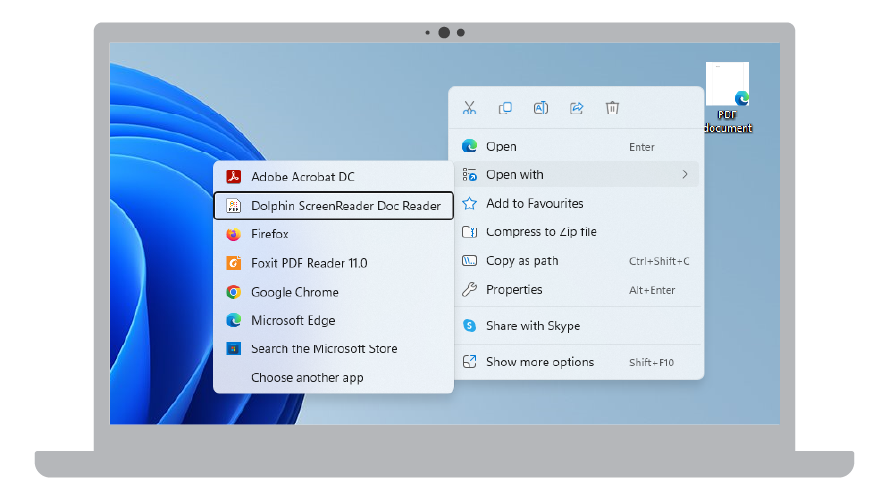
Scan and open PDFs in the Doc Reader directly from File Explorer.
Support for Physical Braille Mode in the latest versions of Microsoft Office applications.
A free subscription to EasyReader Premium for ScreenReader SMA holders.
User interface improvements for the Scan & Read feature.
Plus additional fixes and improvements.
Multi-task with speech using Sound Splitting
ScreenReader 22 makes it easier to use hear announcements from the speech whilst taking part in a video call or listening to music or a podcast. New settings in the Speech Advanced Options include:
Sound splitting. This enables users to listen to the computer audio through one earphone and the ScreenReader speech through the other.
Audio ducking. This enables users to decrease the volume of the computer audio whilst the ScreenReader voice is speaking.
Scan and open PDF documents directly from File Explorer
A new option to “Open with” ScreenReader makes it easier than ever to scan and open PDFs in the Doc Reader.
Find a PDF document in File Explorer, select “Open with” from the context menu, then choose to open the PDF with the Doc Reader. The PDF will be scanned and opened in the Doc Reader where it can be read in its original layout, in a text view, or a combination of both. The option for “open with” ScreenReader is even available in File Explorer when ScreenReader is not running.
Physical Braille in Microsoft Office
ScreenReader 22 introduces support for Physical Braille in the latest releases of Microsoft 365.
While Logical Braille sends text to a Braille display in the order it appears on the screen, Physical Braille will also show the precise positioning of characters on a line with any gaps that appear between them on the braille display. This provides a greater level of detail so Braille readers can understand the layout of text in a document, an email, spreadsheet or presentation.
From the release of ScreenReader 22, Physical Braille mode is now available for people using Microsoft 365 current channel and Office 2021 versions of Microsoft 365 Word, Excel, Outlook and PowerPoint.
Free EasyReader Premium subscription for SMA holders
All ScreenReader customers with an active Software Maintenance Agreement (SMA) can now read their accessible books on any device with a free subscription to EasyReader Premium.
EasyReader Premium unlocks exclusive features in the free EasyReader App for iOS, Android, Windows and FireOS. This includes:
Synchronisation of accessible books, bookmarks and reading preferences across devices.
Support for Google Classroom and Microsoft Education.
Access to EasyReader App for Mac.
Plus, more Premium features coming soon, including support for text-based PDFs.
To benefit from EasyReader Premium, simply open and sign in to EasyReader App for Windows through the ScreenReader control panel. To do this:
Open the ‘Media’ tab in ScreenReader.
Select ‘Books’, then choose ‘My Books’ from the drop down.
Then login to the EasyReader App.
If your ScreenReader licence has an active Software Maintenance Agreement, a free subscription to EasyReader Premium will be enabled for your Dolphin Account. If your ScreenReader licence does not have an active Software Maintenance Agreement, you will still be able to enjoy all the benefits of the free EasyReader App.
Following customer feedback, ScreenReader 22 introduces usability improvements for the Scan and Read feature.
A new “Scan and Read” group has been added to the Media tab of the control panel. The Scan and Read group includes the following options:
• Open File. Use this option to scan and read text from a PDF or image file. This option also allows you to open files that have previously been scanned.
• From Scanner. Use this option to scan and read printed text from a scanner.
• From Clipboard. Use this option to scan and read text from images saved to the Windows clipboard. This option works with standard text and text from images that have been copied to the clipboard.
As part of these changes, the ‘Books’ option has also been moved to the ‘Entertainment’ section of the Media tab.
Additional fixes and improvements
NEW: Doc Reader. PDFs which are password protected can now be opened in the Doc Reader.
FIX: Doc Reader. The correct options are now displayed in the ‘Mode’ drop down after text from a document or web page is opened in the Doc Reader.
FIX: General. The ScreenReader speech is faster to respond when navigating the screen.
FIX: Google Drive. Fix to ensure users can sign into their Google account to send scanned documents to Google Drive as expected.
NEW: Microsoft Excel 365. Version 22 introduces performance improvements for Microsoft Excel 365. This makes the ScreenReader speech and braille more accurate when editing cells in spreadsheets.
FIX: Microsoft Outlook 2016 and later. Fix to ensure links within HTML emails can now be opened as expected when using the Dolphin Cursor.
FIX: Microsoft Teams. When using Microsoft Teams to share the Desktop, the focus no longer goes to the overlay screen. This makes it easier for people using speech to share their screen with a colleague or friend.
FIX: Microsoft Teams. Items in the calendar in Microsoft Teams are now announced by the speech as expected.
FIX: Place Markers. Fix to prevent ScreenReader closing unexpectedly after adding a Place Marker.
FIX: Read From Here. Read From Here now works correctly after a different speech synthesiser is selected from the ‘Voice Preferences’ dialog.
NEW: Scan and Read. Text within images that are scanned from the clipboard is now opened in the Doc Reader by default.
FIX: Scan and Read. The error message displayed when attempting to perform a scan and read without a scanner connected has been improved.
FIX: Shortcut keys. New descriptions have been provided for the hotkeys available in ScreenReader. This ensures the function of the hotkeys is clear in the Help and also when editing and assigning hotkeys (General > Keyboard Settings > Hotkeys).
UPDATED: Shortcut keys. The Laptop Universal hotkey set has been expanded to include shortcuts for Speak Keys, Dolphin Cursor, Read from here and additional functions.
FIX: Start-up. A fix has been applied to ensure ScreenReader starts up correctly if it has previously stopped responding.
NEW: ScreenReader Help. Improvements have been made to the Help system in ScreenReader 22. The ScreenReader Help now provides a single search field for finding relevant help topics from the ScreenReader manual, using ScreenReader with specific applications, and the Hotkey Helper. The viewer used to display Help text in ScreenReader has also been improved. The viewer now includes a single Window for finding a Help topic and for reading the Help text (without needing to switch between them).
NEW: Web browsing. Horizontal lines (<hr> tags) used to separate different sections of a web page are now announced by the speech. This helps people using speech to better understand the layout of a web page.
FIX: Web browsing. The ScreenReader speech is now faster to respond when browsing web pages in Mozilla Firefox.
FIX: Windows Mail. Items in the ‘Filters’ dropdown in Windows Mail are now announced by the speech as expected.

 United States

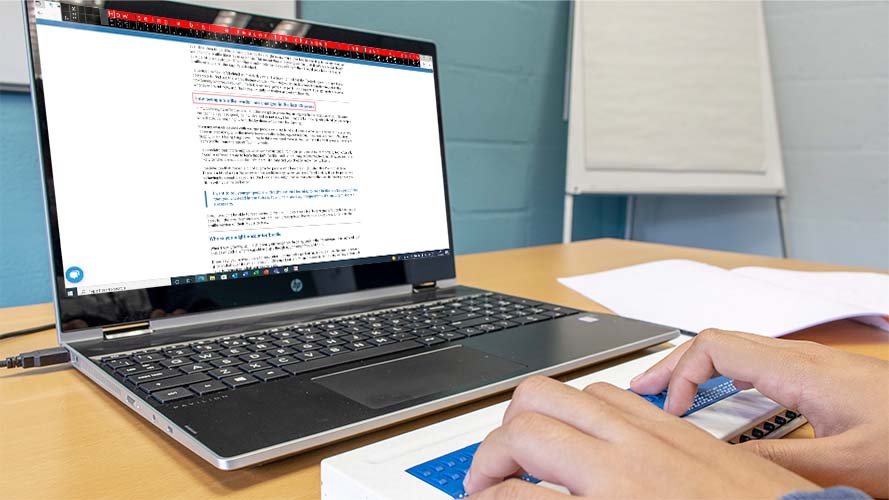 ScreenReader 22 introduces support for Physical Braille in the latest releases of Microsoft 365.
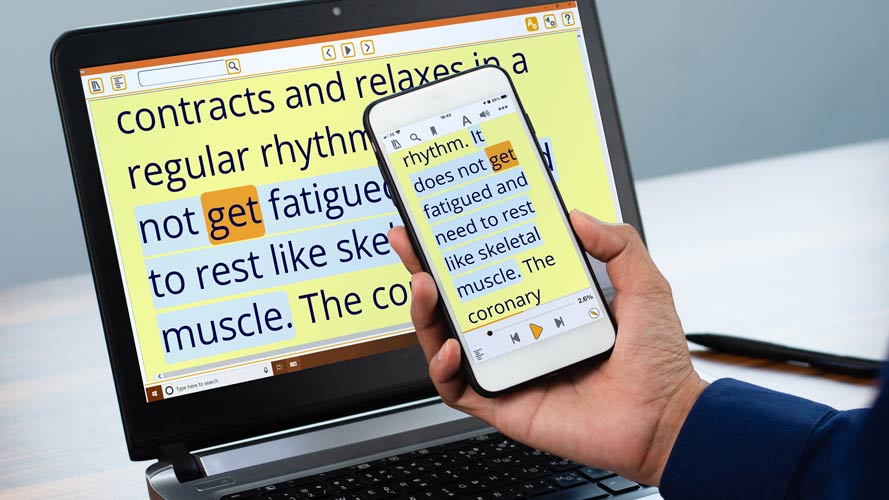 All ScreenReader customers with an active Software Maintenance Agreement (SMA) can now read their accessible books on any device with a free subscription to EasyReader Premium.