 United States
Introducing SuperNova Version 25: New Features for Enhanced Accessibility
Published:
We’re pleased to introduce SuperNova version 25.01, the latest update to the Magnifier and Screen Reader range.
This release introduces new features, performance improvements and accessibility enhancements, all designed to make Windows easier to navigate for people with sight loss. While some features vary across SuperNova editions, version 25.01 delivers important upgrades for all users.
Software Maintenance Agreement (SMA)
Keep your SuperNova assistive tech up to date with the latest features, fixes and improvements with a Software Maintenance Agreement (SMA).
An SMA ensures SuperNova stays compatible with apps including Microsoft Office, Edge, Teams, WhatsApp and Copilot as they update. It also gives you full access to the Dolphin Support Team by phone, remote support or a scheduled callback.
If you rely on SuperNova every day, an SMA gives you the most stable, reliable and secure experience. You can renew annually or purchase up to five years in advance, to save money compared to buying individual upgrades.
Explore new and improved features in SuperNova v25
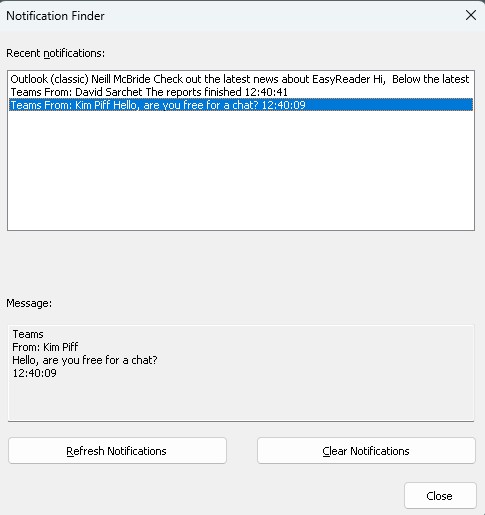
Notification Finder: Never Miss an Alert Again
The new Notification Finder makes it easier to keep track of Windows notifications that may have appeared while your attention was elsewhere.
With its simple, intuitive interface, you can browse a list of recent notifications, jump quickly using first-letter navigation, read full notification text, refresh the list, or clear it once you’re up to date. Notification Finder can be opened from the SuperNova Control Panel or via Layered Hotkeys, giving you fast access whenever you need it.
Toggle Web Quick Navigation Keys for Better Website Control
Some websites, including YouTube and Facebook, use single letter keyboard shortcuts that can conflict with SuperNova Quick Navigation Keys, which make it easier to explore web pages.
Version 25.01 introduces the ability to temporarily toggle Quick Navigation Keys on or off. This allows you to choose whether to use the website’s own shortcut keys or SuperNova Quick Navigation Keys to explore the page.
This gives users greater flexibility and smoother browsing across a wider range of sites.
Install Additional Voices Directly from SuperNova
You can now install new Text-to-Speech (TTS) voices straight from the SuperNova Control Panel, without needing to re run the installer.
This makes it quicker and easier to customise your reading experience with the voices and languages you prefer. Voices are available across multiple languages and you can choose as many voices as you like.
Support for LibLouis Braille Tables
SuperNova 25.01 adds support for LibLouis Braille Tables, offering more than 160 new literary Braille options. These tables can be selected from the Braille settings in the Control Panel.
LibLouis is an open source project, giving users access to a broad and continually updated range of Braille translations.
Whiteboard Connectivity
SuperNova Whiteboard Settings have been updated in preparation for the upcoming Whiteboard Assistant release. This will let students connect to a presenter’s whiteboard through a secure internet connection, even when they’re not on the same network.
The updated Whiteboard Assistant will be available in Spring 2026.
Learn more and request a download
Expanded Choice of Podcasts
The Media section of the SuperNova Control Panel now includes an improved Podcast feature, making it easier to add, remove and search for podcasts from around the world. Users can enjoy more of their favourite shows directly within SuperNova.
Improved App Support and Performance Enhancements
This release includes improvements to use SuperNova with several apps, including:
• Windows Voice Access Toolbar
• Microsoft Copilot App
• Snipping Tool
We’ve also made performance and reliability improvements when using SuperNova across popular applications, including:
• Faster, more responsive navigation in Microsoft Edge
• Improved tracking in the Start Menu Search context menu
• Cleaner Braille output when reading URLs
• Updated support for the new WhatsApp for Windows web wrapper app
Additional Fixes and Improvements
SuperNova 25.01 includes a wide range of additional refinements. To explore these in detail, open the Latest Release Notes from the General menu in the SuperNova Control Panel.
SuperNova 25.01 continues our commitment to delivering powerful, flexible and intuitive accessibility tools for people with sight loss. We’re excited for users to experience these improvements and look forward to sharing more updates soon.
Read a complete list of what's new.
How to Upgrade to SuperNova 25
The upgrade to SuperNova 25 will be rolled out to existing customers over the next few weeks.
Customers with an active Software Maintenance Agreement (SMA) will receive a message when they start up SuperNova to notify them when their 25.01 upgrade is available. This message will also include an option to install the upgrade, simply follow the instructions.
Once installed, software licences of SuperNova 25 are automatically registered and ready to use. Users will not need to enter any new codes to register their software licence.
SMA holders who purchased their software directly from Dolphin will also receive confirmation of their upgrade to version 25 via email.
If you use SuperNova but do not currently have an active SMA, you can upgrade to SuperNova 25 by contacting Dolphin UK Sales or internationally through your local Dolphin dealer.
Keep your software up to date with SMA
Keeping your assistive technology up to date is now more important than ever. Software companies, including Microsoft, now deliver regular, rolling updates to applications, browsers and operating systems. These updates often include new features, bug fixes, security patches, and even changes to accessibility standards. It is vital that assistive technology providers are able to deliver updates, so we can continue to provide the accessibility you need.
You can protect yourself, or your clients, from future changes with a Software Maintenance Agreement (SMA) from Dolphin. The SMA provides all updates and upgrades to SuperNova for twelve months. It helps ensure peace of mind that your SuperNova licence keeps pace with Windows 11 as it evolves, and continues to deliver the accessibility you need in education and the workplace.
Explore SuperNova
SuperNova is a range of magnification and screen reading software for people who are blind or partially sighted. Discover how SuperNova can help you succeed at home, at work and in education.
Free 30-day Trial
30-day trials of all editions of SuperNova and Dolphin ScreenReader are available to download and are open to everyone. Product support is included for all customers during their trial.
Dolphin Blog
Looking for help and advice on assistive technology? Explore the Dolphin Blog to discover how assistive technology is helping people with sight loss around the world to succeed in education, at work and at home.
Share this story now:


